
Inventory Happens on the Floor. Tare Goes With You.
Turn the phone already in your pocket into a fast, accurate inventory tool. Scan products, measure partials, finish counts without a connection, and get alerted the moment something needs attention.
The mobile app is built for the walk-in, back bar, stockroom, and receiving dock, while every completed count stays connected to the same Tare platform your managers use.

Scan to download
Scan
Match products in seconds
Measure
Weigh partial containers
Respond
Act on real-time alerts
Sync
Upload offline work later
Invoice Scanning
Turn invoice photos into receiving line items.
Partial Measurement
Use a Bluetooth scale or visual fill estimation.
Barcode Scanning
Move shelf to shelf with your phone camera.
Real-Time Updates
Push alerts the moment inventory activity needs attention.
Offline Support
Keep counting through weak or missing Wi-Fi.
AI Assistant
Ask about stock, costs, and reports in plain language.
Mobile invoice capture
Scan the Invoice. Capture Every Line.
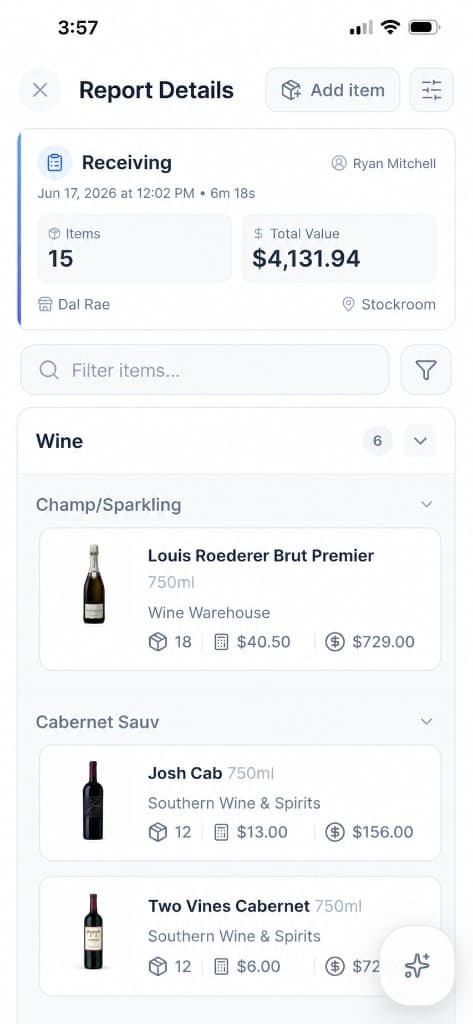
Turn the supplier invoice in your hand into structured receiving data before it ever reaches the office. Take a photo in the mobile app and Tare extracts the supplier, products, quantities, unit sizes, and prices down to the line item.
Review the matched items, resolve anything unfamiliar, and add the clean data directly to the receiving report. Your inventory and costs stay connected to what actually arrived at the back door.
- Capture paper invoices from the receiving workflow.
- Extract item names, quantities, pack sizes, and prices automatically.
- Match supplier descriptions to the products already in Tare.
- Send verified line items into receiving without retyping them.
Scan the invoice
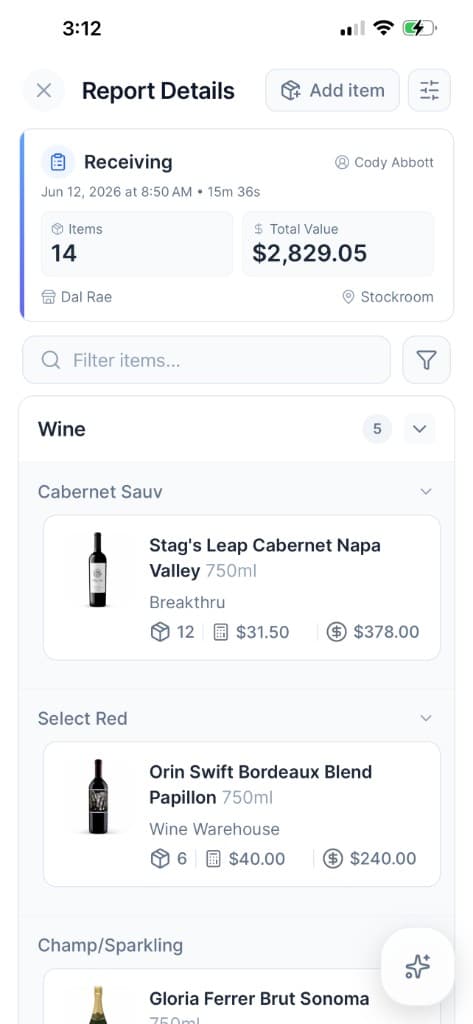
Receiving report
Two ways to measure partials
Measure Every Partial. Know What Is Left.
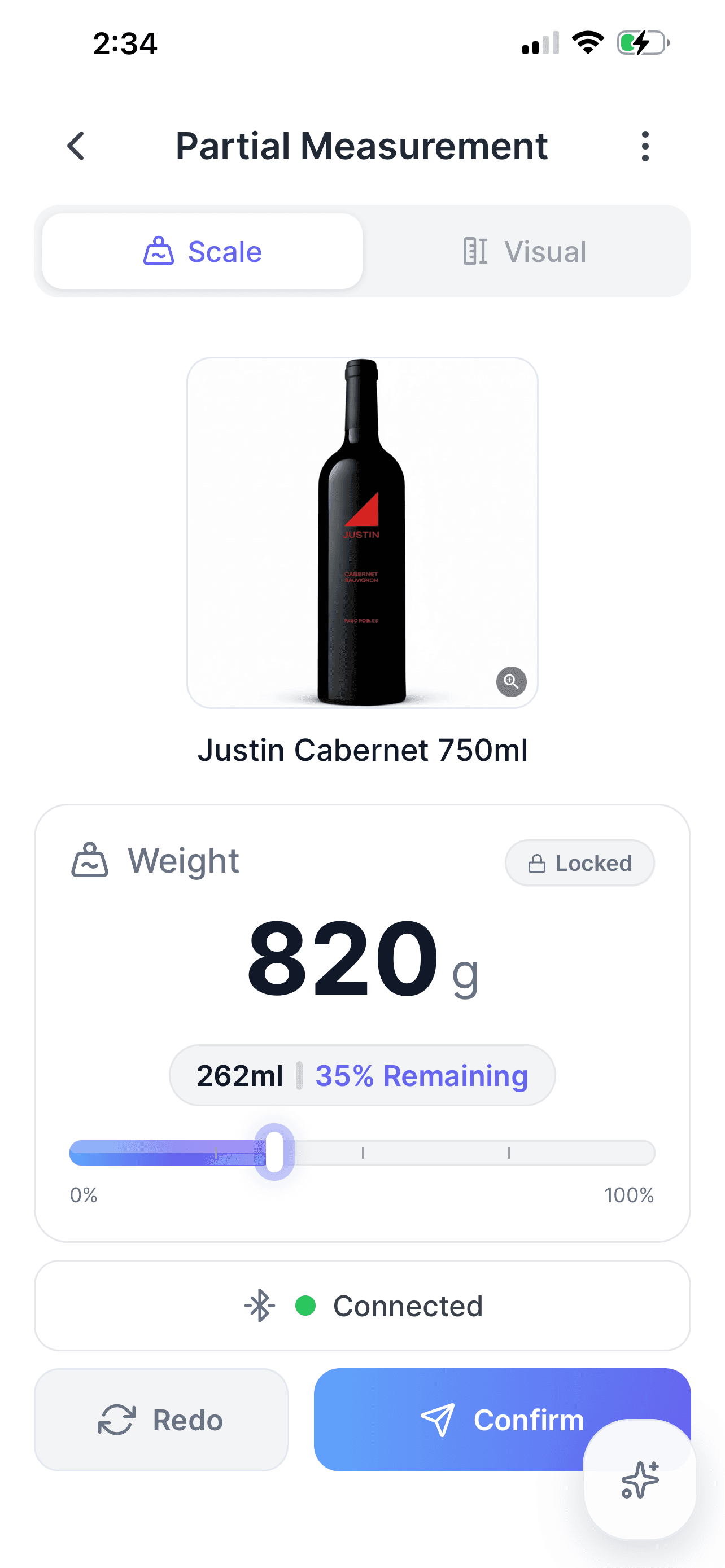
Choose the fastest accurate method for the item in front of you. Connect a supported Bluetooth scale for a live weight reading, or use visual measurement to mark the fill line directly against a calibrated bottle image.
Both workflows convert the partial container into a consistent remaining quantity and keep the result attached to the same count. Staff can switch methods without leaving the Partial Measurement screen.
- Capture stable Bluetooth weight readings in real time.
- Estimate fill percentage visually when a scale is not available.
- See remaining volume and percentage before confirming.
- Use milliliters or fluid ounces across either method.
Lightning-fast inventory scans
Point, Scan, Keep Moving
Open the scanner from a count session and use the phone camera to find the product instantly. Staff can move through shelves in a natural counting order instead of stopping to type every item name.
When a product has multiple pack sizes, Tare lets the counter choose the correct case, pack, or individual unit before entering quantity. That keeps fast scanning from turning into messy inventory data later.
- Scan directly from the active count session.
- Select the right pack size before recording quantity.
- Add or reconcile unknown barcodes without abandoning the count.
- Use search whenever a label is missing or damaged.
Tito's Vodka
750ml · Main Bar Stock
0 80686 01001 5
0 80686 01001 5
Scan Barcode
Position barcode within frame
Tare
nowNew Task Assigned
Jordan assigned you a spot check for 5 items at Downtown Bistro in Line Prep.
Tare
2m agoShift Count Reminder
2 people at Main Kitchen have shifts ending in about 15 minutes and have not submitted counts.
Tare
8m agoRecord Edited
Alex edited Whole Milk, changing the count from 4 to 6.
Tare
12m agoSpot Check Completed
Cody counted 6 items in the Main Bar.
Tare
18m agoTransfer Count Completed
Eric transferred 17 items from the Stockroom to the Main Bar.
Constant alertness & real-time updates
Know What Changed. Ask What's Next.
Tare keeps managers constantly aware of operating activity and gives them a direct line to inventory intelligence on the phone they already carry. Push notifications surface what needs attention; AI chat answers the questions that follow.
Assign spot checks, follow receiving and transfers, and audit record edits without watching a dashboard all day. When something needs a closer look, ask Tare AI about stock levels, receiving history, costs, or what to reorder next.
- Get push alerts when inventory activity needs attention.
- Assign spot checks and notify staff with the exact scope attached.
- Ask AI questions about stock, costs, and receiving history.
- Use the same assistant on mobile and desktop.
- Set push and email defaults by role for the whole organization.
- Attach product, label, or receipt photos for more context in chat.
Built for difficult stockrooms
Bad Connection. No Interrupted Count.
Restaurants have bad connectivity as a rule, not an exception. Walk-in coolers and freezers are Faraday cages. Dry storage and basement stockrooms have no signal. Back-of-house Wi-Fi is often weak, saturated, or shared with the POS. Anywhere inventory needs to be counted is probably where the internet connection won't be.
After the initial sync, Tare keeps the inventory data needed for counting directly on the device. Staff can scan, search, create records, and finish the count while offline. Reports wait safely on the device, then upload automatically in the background when the connection comes back.
- Keep scanning and editing counts without internet access.
- See clear offline, syncing, and pending-upload indicators.
- Upload queued reports automatically after reconnection.
- Review upload history to confirm every count arrived.
Upload History
Working offline
Counts stay on device until Wi-Fi returns.
Physical Count · Stockroom
Counting continues without a connection
Physical Count
24 items · Jun 17, 3:42 PM
Transfer Count
11 items · Jun 17, 2:18 PM
Give Every Counter a Better Tool
Faster scans, smarter answers, automated invoice capture, accurate partials, immediate alerts, and reliable offline work all connect back to one inventory system.