Interpret the report
Ask Tare AI to explain what a report is showing — which items moved, which categories stand out, and what changed since the last count.
Multimodal agent · works the interface
Type, talk, or send images — however you prefer to communicate. Tare AI does not just answer questions. It searches your catalog, builds the exact apportionments you describe, and creates the POS-to-inventory linkages directly in the interface.
It is also the interpretive layer on top of your reports: ask about variance, understand what changed, and leave with a cause and action plan — without rebuilding the analysis yourself.
Most systems stop at the table. Tare AI helps you read it — variance, receiving, perpetual inventory, transfers, price movement, activity logs, and more. You do not need an analyst to translate what the numbers mean or where to look first.
Ask Tare AI to explain what a report is showing — which items moved, which categories stand out, and what changed since the last count.
Drill into over-portioning, receiving gaps, recipe mapping issues, transfer mistakes, or supplier changes without rebuilding the analysis yourself.
Get a prioritized checklist for what to verify next: recount a zone, audit a recipe, review invoices, or assign a spot check to the right person.
When variance spikes, the question is never just “what is the number?” It is “what caused it, and what do I do Monday morning?” Tare AI is built for that second question.
Variance investigation
Ask why an item spiked and Tare AI pulls the variance math for you — expected versus actual usage, whether the gap is statistically meaningful, and what it cost in dollars if the trend holds.
It does not stop at explanation. Tare AI suggests concrete next steps and assigns daily spot checks to the right person — so nothing falls through the cracks between shifts.
Tito's Handmade Vodka 1L
Expected
18 btl
Actual
26 btl
Variance
+8 btl (+44%)
At $22.40/bottle, that's $179.20 in unaccounted product cost this month.
Suggested action plan: assign daily spot checks on Tito's Handmade Vodka in the Main Bar so you can keep a closer eye on this.
Who should I assign these daily spot checks to?
Done — Marcus will get a daily spot check on Tito's Handmade Vodka in the Main Bar starting tomorrow.
Spot check task created
Tito's Handmade Vodka 1L
Ask about any report
Open a variance report, receiving analysis, perpetual snapshot, or activity log and ask Tare AI what stands out. It helps you separate noise from signal, connect the report to the operational story behind it, and decide what deserves investigation first.
That makes Tare AI the interpretive layer across your operation — the same assistant on mobile and desktop when a manager needs to understand a discrepancy, brief the team, or build an action plan for tracking it down.
Works across report types including variance and usage analysis, receiving and purchasing reports, perpetual inventory snapshots, transfer and activity logs, price extremes and cost changes.
Tare AI
Questions managers actually ask
Example action plan
AI invoice parsing
Snap a photo or upload a PDF and Tare uses vision models to extract the supplier, products, quantities, unit sizes, and prices down to the line item — no spreadsheet shift required.
AI then matches what the supplier wrote to the products and vendors already in your catalog, even when names, pack sizes, or abbreviations do not line up exactly. You review the exceptions; the obvious matches flow straight into receiving.
Once orders are in, ask Tare AI to pull them back up — by supplier, date, or item. It returns the same quantities, unit costs, and totals you see in your receiving report, with the original invoice attached as reference when you need proof.
Here's your most recent receiving order from Southern Wine & Spirits — Jun 8, 2026 at 2:15 PM. 3 items, $358.60 total.
Tito's Handmade Vodka 1L
Southern Wine & Spirits
Kim Crawford Sauvignon Blanc 750ml
Southern Wine & Spirits
Bulleit Bourbon 750ml
Southern Wine & Spirits
Invoice reference
SOUTHERN WINE & SPIRITS
INVOICE #SW-448291
Jun 8, 2026 · Dal Rae
Tito's Handmade Vodka 1L
Kim Crawford Sauvignon Blanc 750ml
Bulleit Bourbon 750ml
Original invoice attached from the receiving report — line items, costs, and quantities match what was scanned into Tare.
From scan to receiving report
The same invoice data that powers chat answers starts on the floor — scan the delivery, match every line, and submit a receiving report with quantities and costs already filled in.
Scan the invoice
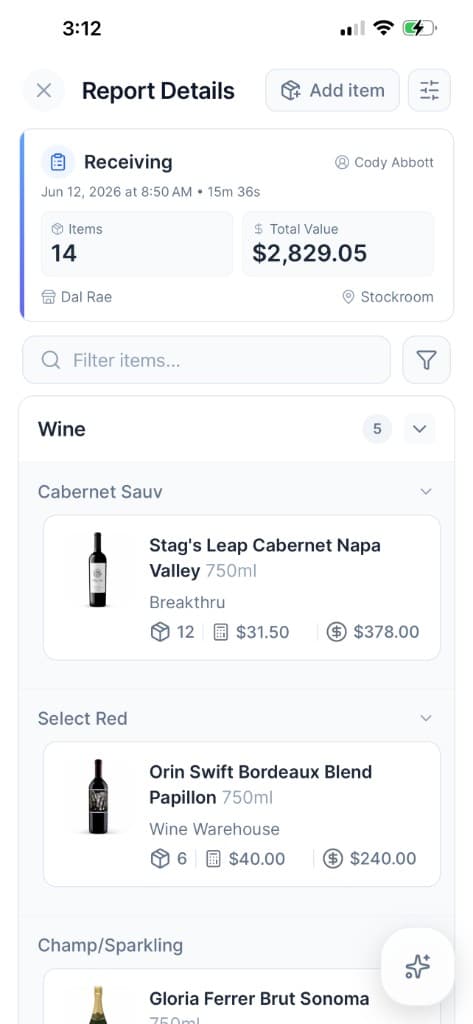
Receiving report
A faster path to value
Send supplier files, item spreadsheets, and POS exports — messy is fine. We bulk-import your catalog, connect menu and sales, and use AI to map what you sell to what you stock. You review the exceptions; we handle the rest.
Send us supplier PDFs, images, CSVs, or spreadsheets. We extract the details, match existing suppliers, and give you a clean review before anything goes live.
Bring over products, pack sizes, units, categories, and supplier relationships in bulk. Your team does not have to rebuild years of item data one row at a time.
Connect or import your menu items, prices, categories, and sales history from the POS you already use, including on-premise systems.
Smart Map connects the obvious relationships between what you sell and what you stock, then isolates the recipes and edge cases that deserve your judgment.
Restaurants with thousands of items and ingredients can move from scattered exports to a review-ready workspace in the span of an afternoon. AI handles the predictable matches. You spend your time on the recipes that make your operation yours: house pours, prep batches, modifiers, and signature dishes.
Your first week should be spent acting on the data, not typing it in.
Example onboarding workspace
From files to first count
Dinner Menu
Cocktails
Entrées
Structured POS items
Menu extraction for onboarding
During setup, Tare can extract menu item candidates from the files you already have — upload a menu photo or PDF, or point us at your restaurant website — and turn them into structured POS items ready for review.
That gives Smart Map a head start connecting what you sell to what you stock, so your team spends onboarding time on judgment calls instead of manual menu entry.
Smarter item setup
Every new product does not have to start as a blank form. When your team creates an item, Tare AI suggests category and subcategory based on the item name and the categories you already use across your catalog.
That keeps new records organized from day one, improves search and reporting, and saves managers from repeatedly making the same classification decisions.
New item
AI suggestion
Item name
Grey Goose Vodka 750ml
Category
AI suggestedLiquor
Subcategory
AI suggestedVodka
Open a variance alert on your phone and ask Tare AI what to check first before service starts.
Interpret full reports on desktop, compare periods, and build an investigation plan for your team.
Attach shelf photos, labels, or invoices so Tare AI can help explain what a report is really showing.
See how Tare AI acts as the interpretive layer — explaining any report, investigating variance, and leaving you with a cause and action plan.